



I’ve been enjoying my collaborations here on Substack, and today I want to bring in someone who has a special place in my career.
Please meet Ula, whom I studied UX design with many years ago, when I was an unemployed Polish student living abroad, trying to survive on money from my parents and a few small jobs.
I was studying in Warsaw, and Ula quickly became a friend and an expert I still look up to.
She often hosted me in her apartment when I flew to Warsaw for our study weekends, which saved me from cheap hotels with stained carpets, paper-thin walls and showers that ran cold after two minutes.
After class, we would sit in her apartment and debate everything from the future of tech to immigration and Polish politics.
Ula Krowicka is a digital accessibility specialist and user researcher with more than 10 years of experience.
She is based in Berlin and recently co-founded a consultancy serving European e-commerce brands.
She helps product teams identify barriers in customer journeys, prioritise improvements, and integrate accessibility into everyday product work.
This helps brands serve more customers, respond to European accessibility requirements, and build accessible practices that last.
Say hi to Ula on LinkedIn, or follow her work on her website: https://www.soola.io/.
What digital accessibility means for your target customer
Digital accessibility helps teams design for the real conditions people use when they browse, decide, and buy. It can remove barriers for existing customers, reveal overlooked audiences, and improve how teams define product quality.
Picture the customer your team already knows very well.
You know what they value, what they can afford, where they shop, and which messages bring them to your product. You may have a persona, jobs to be done, user scenarios, an ideal customer profile, and research showing why they choose you.
The customer buying from your website with one hand while holding a baby is still your target customer, and in that moment they may encounter access barriers.
They may be colour blind or have low vision.
They may be going through a stressful time and unable to focus fully.
They may use keyboard navigation, voice control, magnification, or a screen reader.
They may be tired, distracted, or moving quickly between tasks.
They are still your target customer. In each of these situations, they may encounter access barriers.
Product teams are trained to define an audience.
This focus supports clear decisions and communication.
A polished customer profile creates a blind spot when it becomes a fixed picture of how that customer sees, moves, reads, understands, and uses technology.
Real customers do not arrive in fixed conditions.
Microsoft’s Inclusive Design Persona Spectrum illustrates how access needs can be permanent, temporary, or situational.
Any of these can shape if someone finds a product, understands an offer, completes a form, or makes a payment.
Accessibility begins when the customer journey includes those conditions.
Accessibility also reveals customers beyond the people represented by your main target profile. They may not fit that profile, but they are still potential customers.
You would not close the door of a physical shop because someone falls outside your primary audience, yet an inaccessible website can do exactly that without the team realising it.
When people cannot access product information or complete a purchase, the digital door is effectively closed to them.
This is not a niche audience.
The World Health Organization estimates that 1.3 billion people, 16% of the world’s population, or one in six, experience significant disability.[1]
23.9% of people aged 16 and older reported a disability, defined as an activity limitation, in 2024.[2]
These figures cover disability; the group affected by accessibility barriers is broader because temporary and situational access needs also matter.
This audience also has considerable spending power.
The 2024 Global Economics of Disability Report estimates that people with disabilities aged 25–64 in Canada, the EU, the UK, and the US control more than $2.6 trillion in annual disposable income.
Around $1.3 trillion of that is attributed to people with disabilities in the EU and the UK.[3]
E-commerce website accessibility lives in ordinary product decisions
Think about a typical e-commerce journey, from browsing a catalogue to completing checkout.
Each step includes familiar product questions and questions about if customers can use the experience in different ways:
Browse:
Can customers find what they are looking for through clear categories, useful filters, and search that copes with mistakes?
Can they also open menus, apply filters, and sort results using only a keyboard?
Does a screen reader user find out that the results changed after a filter is applied?
Product page:
Do the images show the item clearly from different angles, and does the description contain the details needed to make a decision?
Do informative images have useful text alternatives?
Do headings and labels still make sense when read aloud, outside their visual layout?
Choosing a variant:
Is it clear which colours and sizes are available?
Can someone choose an option using only a keyboard?
Can a screen reader user tell which option is selected?
Cart:
Can the customer review what they are buying and change the quantity or remove an item?
Can they add the item and reach the cart without a mouse?
Checkout:
Are payment, shipping, and return details easy to find, and does the process feel trustworthy?
When a form field is wrong, does the error explain what happened and how to fix it without relying on colour or contrast alone?
These are product-quality questions.
Looking at the general experience and access needs together helps teams see where an ordinary design decision can open or block the journey.
Common website accessibility barriers and questions to ask
Many accessibility barriers come from familiar design and development patterns. Here are four common examples, what they mean for customers, and how teams can fix them.
The solutions below illustrate established practices, but their implementation depends on the technology and interaction.
Teams should verify complex changes with an experienced accessibility practitioner and test the completed journey.
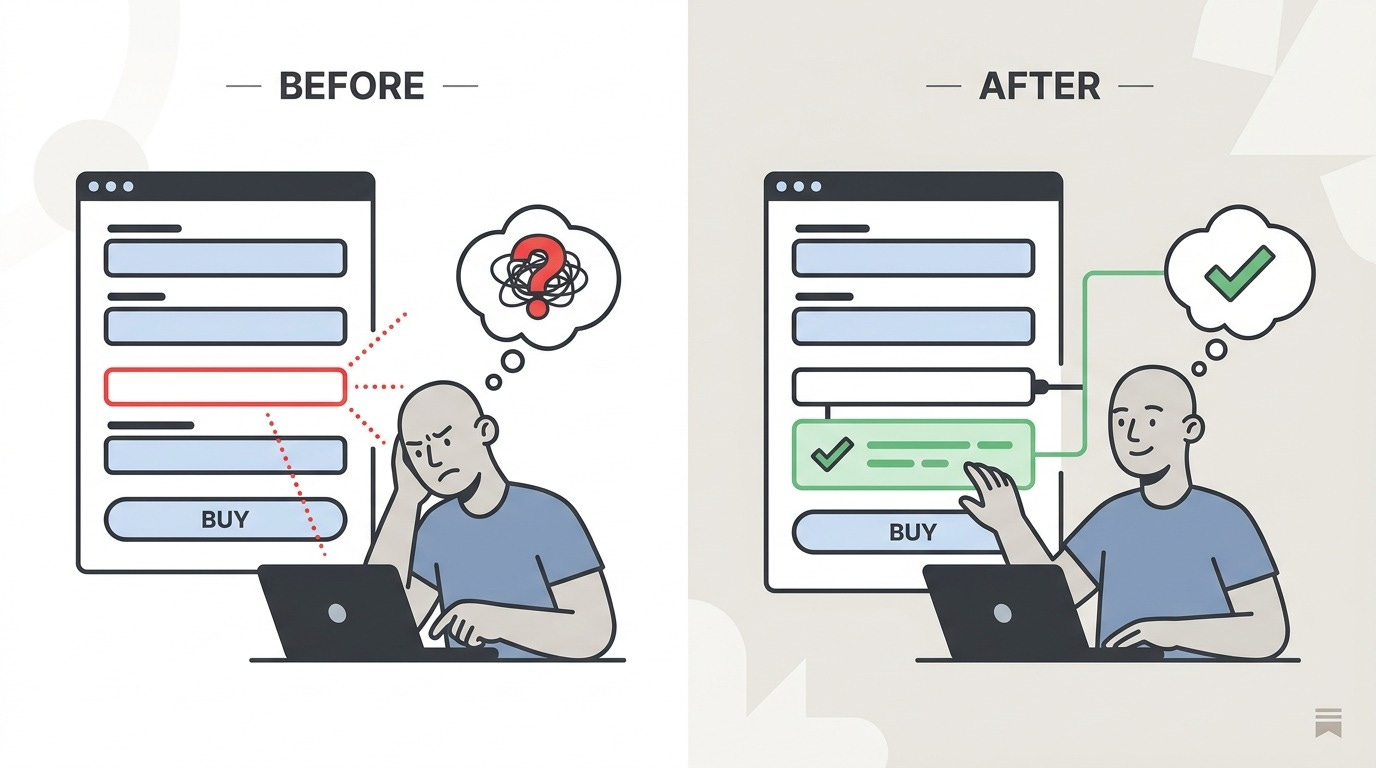
1. A checkout error is shown only with colour
What the customer encounters: A checkout form marks an invalid field by changing its border to red. A customer who is colour blind, has low vision, or uses a screen reader may not know which field needs attention or why they cannot continue.
What it costs: The customer cannot correct the problem, complete payment, or confidently continue. The business risks an abandoned checkout.
Question to ask: Does the error identify the field, explain what happened, and tell the customer how to fix it without relying on colour alone?
2. A keyboard user cannot reach the cart
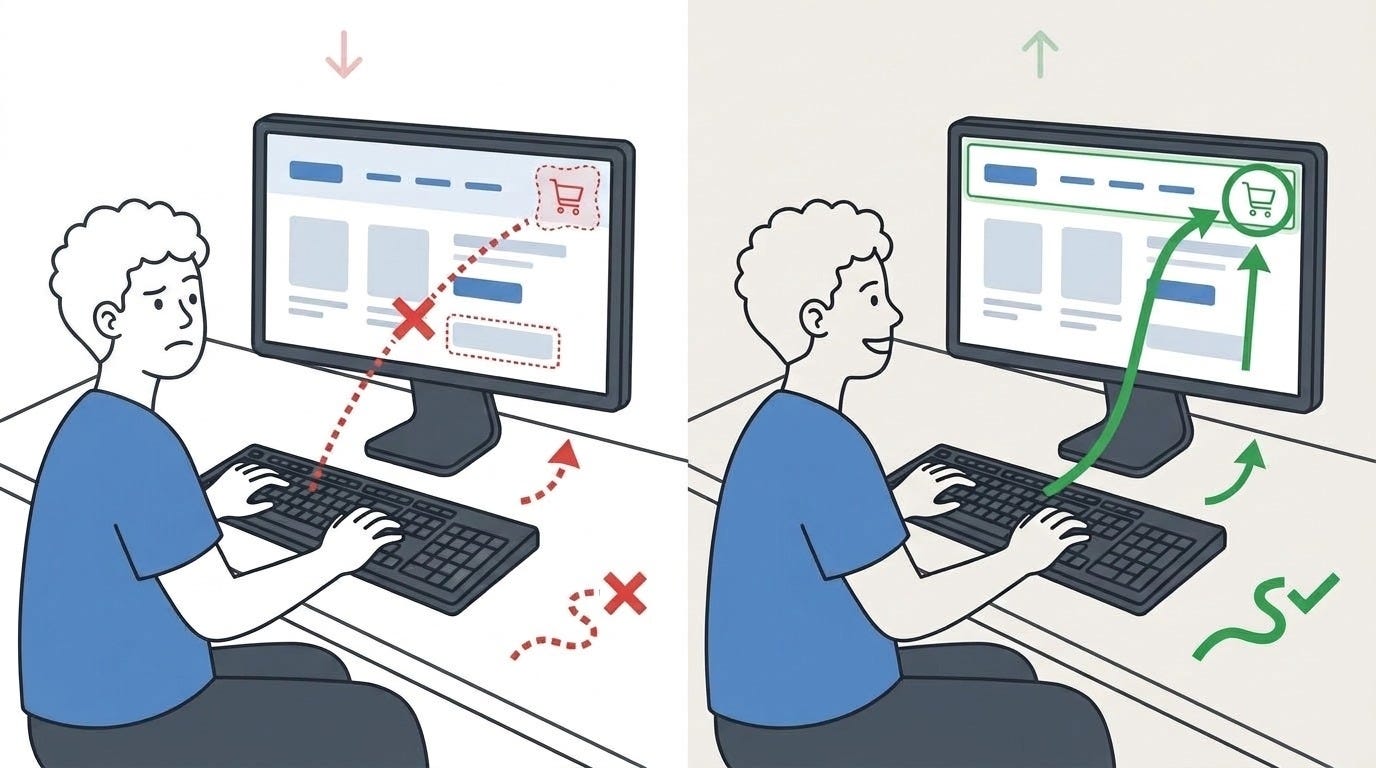
What the customer encounters: A user navigates with the Tab key, but focus skips the cart. They may be able to select a product and still have no way to review or buy it.
What it costs: The shopping journey is blocked before checkout, even when the customer has already decided to buy.
Question to ask: Can I select a product, add it to the cart, and reach the cart using Tab, Shift + Tab, Enter, and the space bar, with a visible indication of where I am?
3. Filters cannot be used or their results change without notification
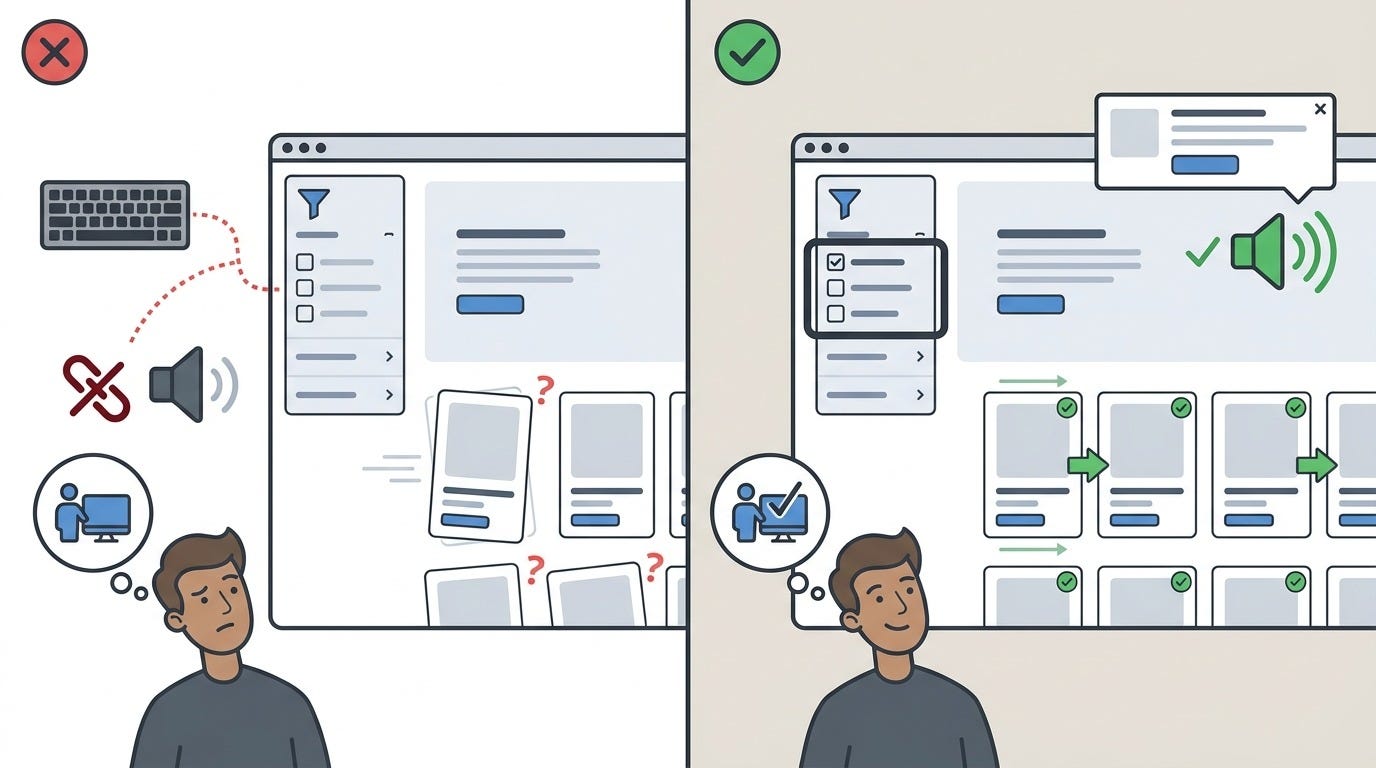
What the customer encounters: A user cannot open or apply filters using a keyboard. A screen reader user applies a filter but receives no indication that the product results changed.
What it costs: Customers cannot narrow a large catalogue, confirm that a filter worked, or find relevant products efficiently. They may leave because the selection feels impossible to navigate.
Question to ask: Can I open, apply, and remove each filter without a mouse? After a filter is applied, does the experience communicate that the results changed and how many products remain?
4. Product choices rely on colour or visual state alone
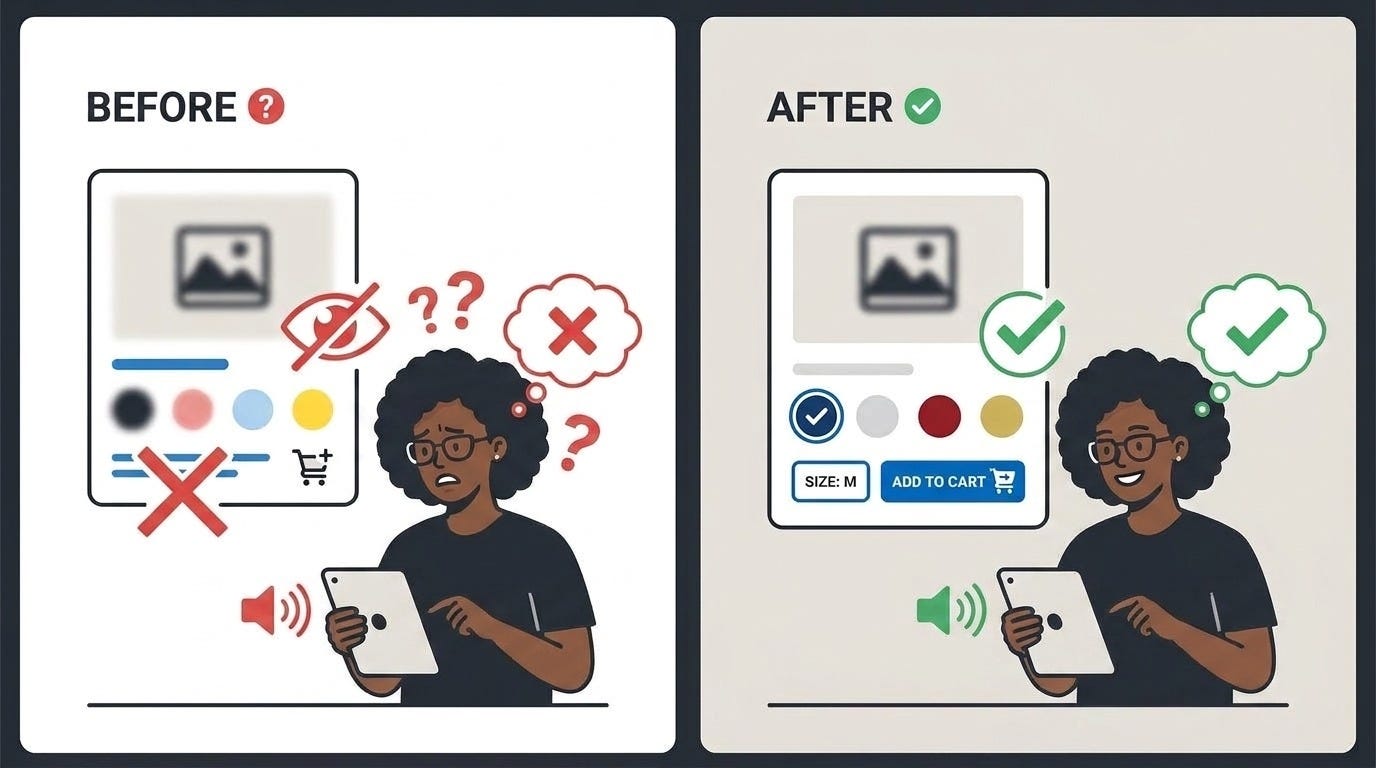
What the customer encounters: Colour swatches, size buttons, and selected states look clear on screen but remain ambiguous to people with low vision, colour-vision differences, or screen readers. A customer may be unable to tell which option is available or selected.
What it costs: Customers can choose the wrong variation, hesitate because they cannot confirm their choice, or abandon the purchase.
Question to ask: Can customers identify every option and tell which one is available, unavailable, or selected when using a keyboard, a screen reader, or a display where colours are difficult to distinguish?
If these conditions are not met, customers who rely on them may leave and shop elsewhere. That has commercial consequences.
In the 2019 UK Click-Away Pound survey of people with access needs, 86% said they would spend more online if websites were more accessible.
It also found that 75% had chosen to pay more for a product on an accessible website rather than buy the same product from a less accessible site.[4]
The barriers in this journey arise from decisions about design, content, code, and product requirements. Accessibility grows from how the team works across all of them.
Accessibility belongs in the default product experience
Accessibility has often been treated as a special accommodation added after the main product has already been designed. It is increasingly recognised as a basic condition of product quality.
That shift changes the starting point.
Teams need to understand the people, contexts, and access needs surrounding an important journey; translate those needs into requirements; use accessible patterns; and test the result with appropriate tools, manual methods, and disabled users.
This work can begin with one journey and a few repeatable habits. The practical steps below show how a team can start and gradually build a more reliable practice.
So, how do you begin?
1. Learn the four principles of accessibility
Start with the four principles that organise the Web Content Accessibility Guidelines, commonly known as POUR:
Perceivable: People can access the information in more than one way. Images have text alternatives, videos have captions, and text has sufficient contrast.
Operable: People can use the interface with different input methods, including a keyboard.
Understandable: Content, navigation, and error messages are clear and predictable.
Robust: The product works across browsers and with assistive technologies such as screen readers.
You do not need to memorise every success criterion. Learn enough to recognise the principles in your daily work.
Useful starting points include the W3C Web Accessibility Initiative’s introductory resources, Accessibility in Practice: Build Digital Experiences Everyone Can Use, and WCAG in plain English.
2. Test website accessibility on one important journey
Choose a journey that matters to customers and the business: browsing and filtering, account creation, booking, checkout, or submitting a contact form.
Try it with a keyboard. Use Tab and Shift + Tab to move, and Enter or the space bar to activate controls. Check if you can reach and operate each interactive element, if the order makes sense, and if you can always see where you are.
Run an automated checker such as the Axe DevTools browser extension or Wave by AIM. Treat the findings as a starting point and consider what each issue means for the journey.
3. Learn from disabled people
Review who participates in your research and whose experiences may be missing. Involve someone with relevant experience in planning accessible recruitment, materials, sessions, and compensation. Invite participants to use their own devices, settings, and assistive technologies.
Simulation tools can prompt further investigation into specific interface conditions, such as low contrast or a reduced field of vision. Direct research with disabled people provides the lived context needed to understand how barriers affect them.
4. Record the findings, choose one issue, and name an owner
Document where the problem appeared, what the customer was trying to do, what stopped them, who could be affected, and how it could affect the customer or the business. Include a screenshot, recording, or short set of steps that reproduces the problem.
Choose one issue that blocks an important journey, affects several pages, or creates serious customer consequences. Review it with the people responsible for that part of the product, agree on the next step, and name an owner. Bring in relevant expertise when the cause or solution is unclear.
5. Bring in expertise and make accessibility routine
An experienced accessibility specialist can assess the product, identify priorities, teach practical skills, support remediation, and help the team establish standards. Even one knowledgeable person can introduce better practices and build confidence, as long as the team shares that knowledge.
Turn that learning into regular product practice:
include accessibility in requirements and acceptance criteria;
use accessible patterns and components;
combine automated checks with manual testing;
review accessibility at agreed stages of design and development;
involve disabled people in research and testing;
provide regular opportunities for coaching and practice;
revisit known issues and verify that fixes continue to work.
Accessibility capability develops through continued practice. Clear ownership, suitable tools, and a regular cadence help the knowledge stay within the organisation, while specialists remain available for complex work.
Where the European Accessibility Act fits
The European Accessibility Act, or EAA, is an EU directive that sets common accessibility requirements for specific products and services.
It applies through national laws in EU Member States. Most requirements began to apply on 28 June 2025.
The EAA covers areas including e-commerce services, consumer banking, e-books, electronic communications, parts of passenger transport services, and access to audiovisual media services.
It also covers certain products, including computers, smartphones, payment terminals, and some self-service terminals.
Organisations outside the EU may also be affected when they place covered products on the EU market or provide covered services to EU consumers.
National laws define the detailed obligations, enforcement arrangements, exemptions, and transitional provisions.
Some microenterprises receive specific exemptions. Businesses should check the rules in each relevant country and seek appropriate legal advice.
Compliance matters, and it works best when the underlying product practice is strong. Teams that understand their components, customer journeys, and release processes can respond to legal requirements with greater confidence and less last-minute work.
Begin with the next decision
Start with one important journey. Test it, learn from disabled people, record what you find, and choose one meaningful issue.
Bring in accessibility expertise to guide the work and help the team build a repeatable practice.
Verify the solution, document what the team learned, and repeat the process. With continued practice, accessibility becomes part of how the team defines quality, and more customers can browse, decide, and buy.
Disclaimer: The views and opinions expressed on this Substack and in its related posts and articles are my own and do not necessarily represent those of any current or former employer.